In the past, we used libraries such as urllib or requests to read or download data from webpages, but things started falling apart with dynamic websites.
Due to the increasing popularity of modern JavaScript frameworks such as React, Angular, and Vue, more and more websites are now built dynamically with JavaScript. This poses a challenge for web scraping because the HTML markup is not available in the source code. Therefore, we cannot scrape these JavaScript webpages directly and may need to render them as regular HTML markup first.
For such tasks, particularly where we have to interact with the web browser, selenium is the usual go-to library which uses an automated web browser called a web driver. However, this can be more resource heavy than using the requests library.
The way that JavaScript calls work is that the browser makes a request to the server, using AJAX routines, and the server returns the data to the browser.
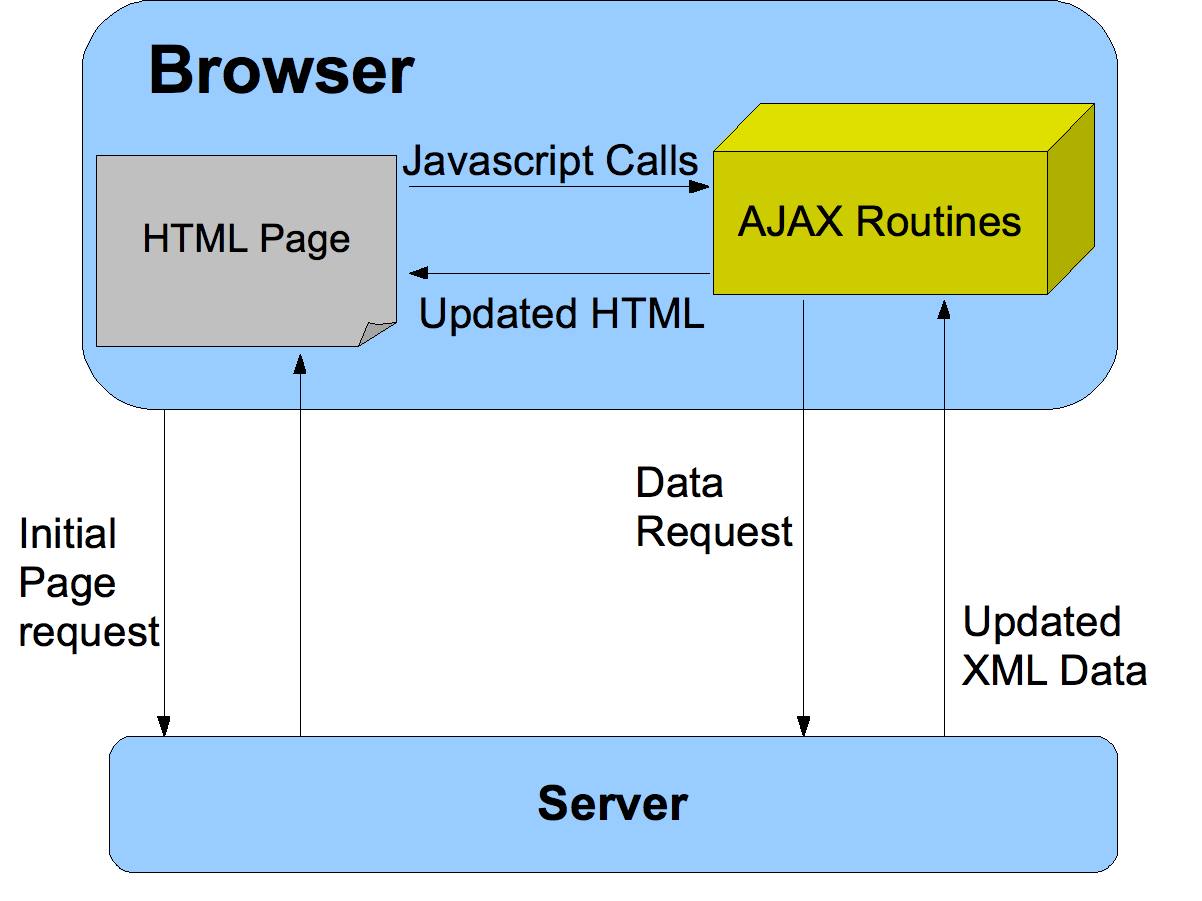
It turns out we can intercept the AJAX routines from the page and reproduce/replay them to get the same data without a browser.
As an example, let us consider a use case which has been covered in the following guide: Using selenium and Pandas in Python to get table data from a JavaScript website. This work was completed by @mshodge as part of the code for v1 of the GitHub repo youshallnotpassport behind the Twitter bot @ukpassportcheck. This project was featured in a Telegraph article: A data scientist found a way to beat the passport renewal queue – and save dozens of holidays.
The guide above uses selenium to obtain a table data from a JavaScript website, in particular to obtain the available appointments for the UK Passport Fast Track Service. The main URL for the service is https://www.passportappointment.service.gov.uk/outreach/PublicBooking.ofml and this service uses JavaScript to render its webpage as you navigate through the options, which require user input.
We will use requests to scrape the same table data by replaying AJAX routines, instead of using a selenium webdriver. This work was implemented as part of v2 of youshallnotpassport which has significantly improved the speed and reliability of the scraping process, since it does not rely on installing and using a web driver.
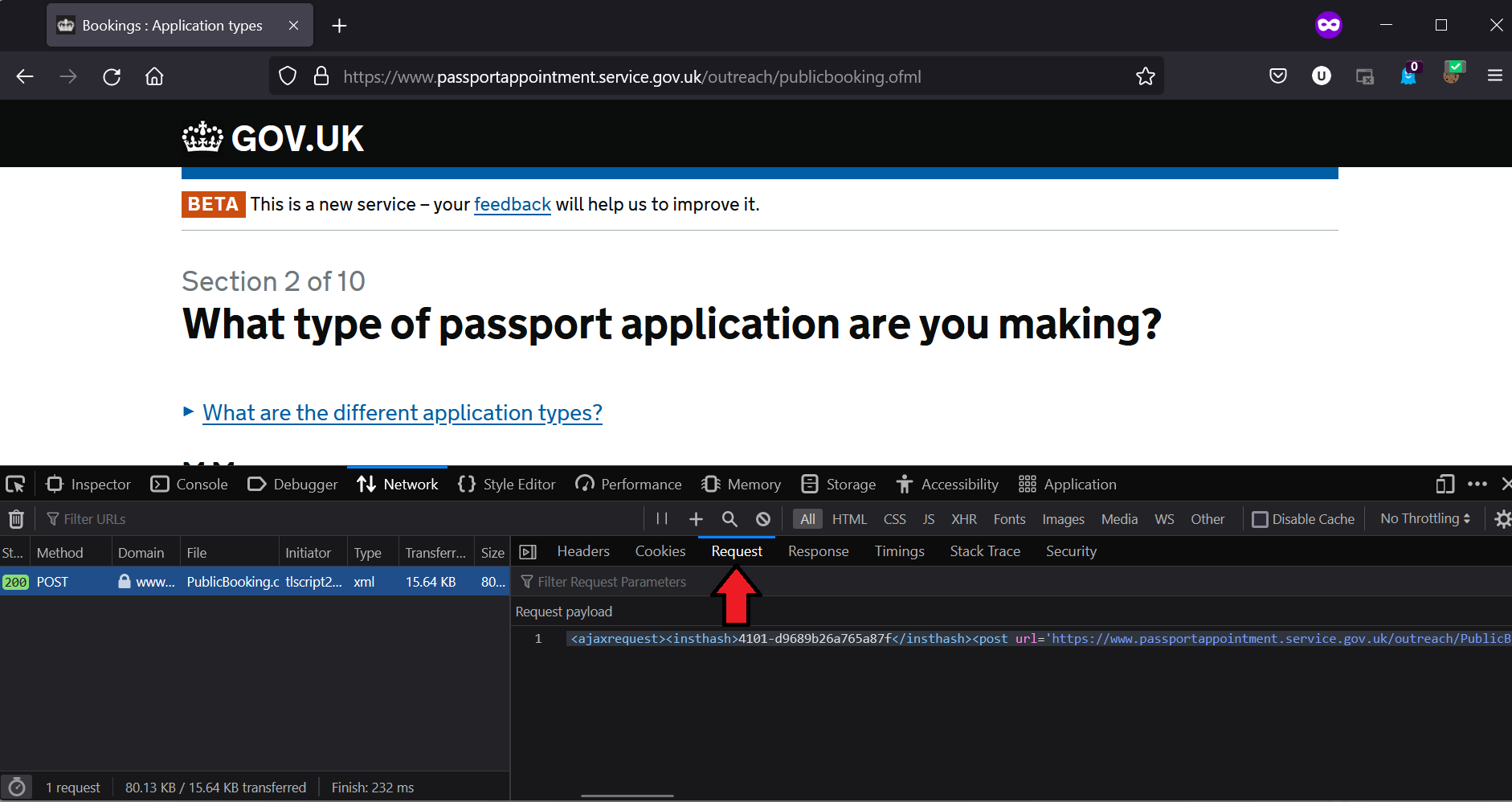
The first step is to visit the url and view the network requests in developer mode. The following screenshots were taken from a Firefox browser.
We look for the first request to the server, which in this case is a POST request:
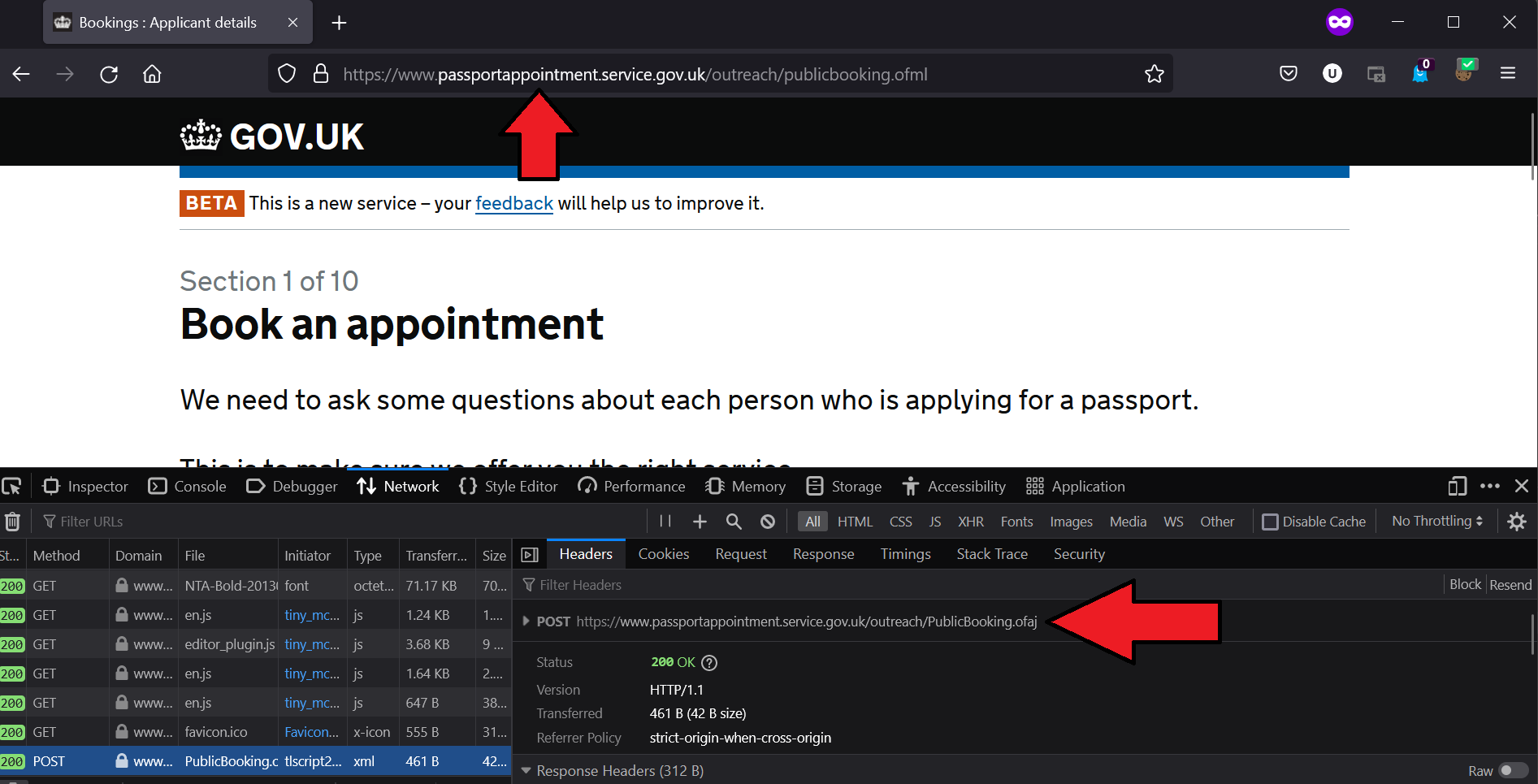
The POST request contains the following request payload:
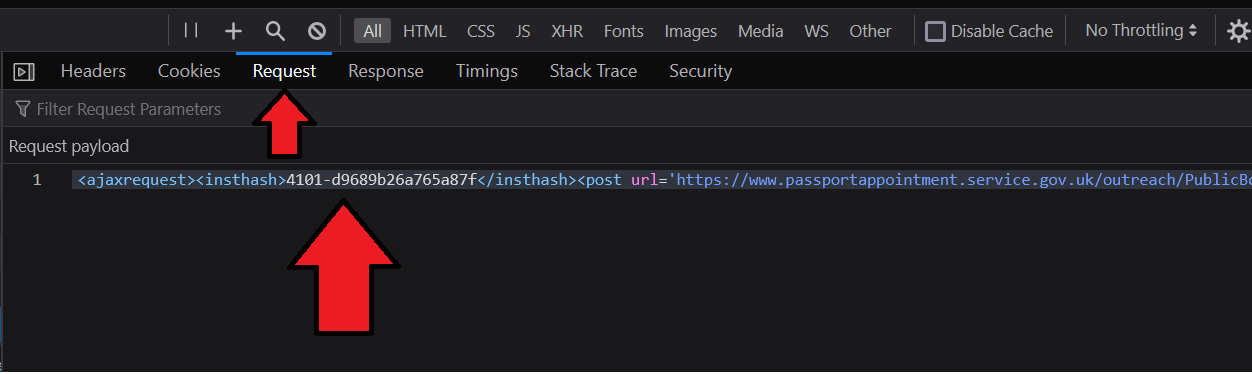
Request payload (after formatting):
<ajaxrequest>
<insthash>4101-d9689b26a765a87f</insthash>
<post url='https://www.passportappointment.service.gov.uk/outreach/PublicBooking.ofml'>
</post>
<saving>TRUE</saving>
</ajaxrequest>
This shows the first request is to initialize the AJAX routines using an instance hash and the tag saving is set to TRUE to indicate that the following AJAX requests should be saved at each step.
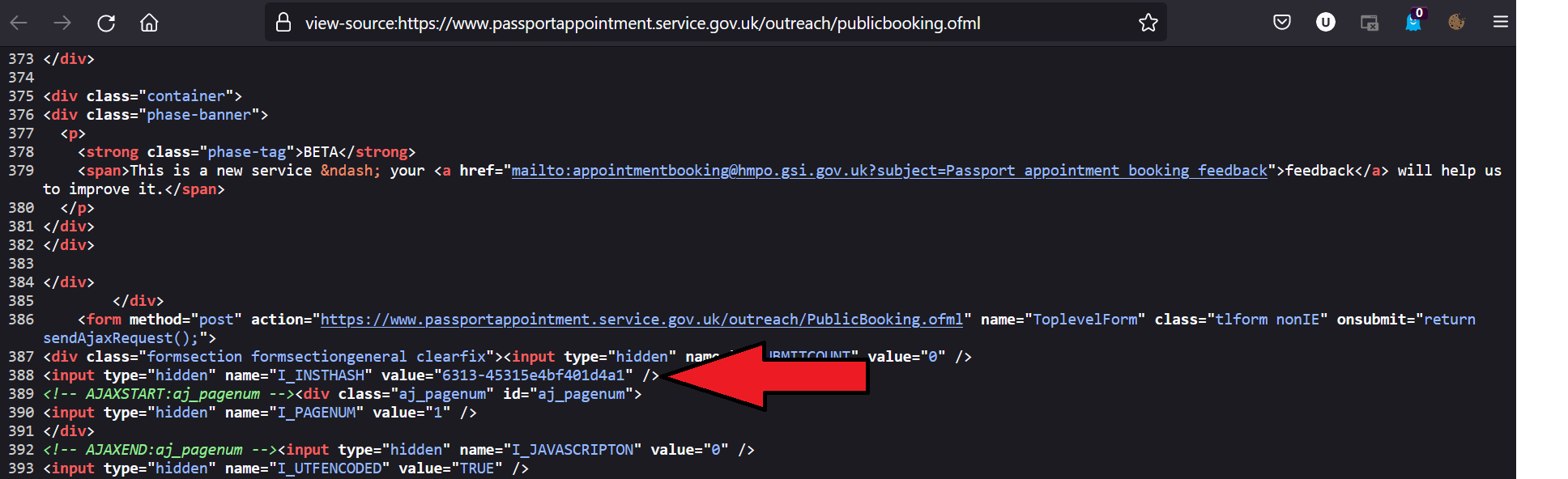
We can find the instance hash by looking at the insthash tag contained in the source from the initial request to the url.
Now let’s move to the next section of the application by appending dummy data:
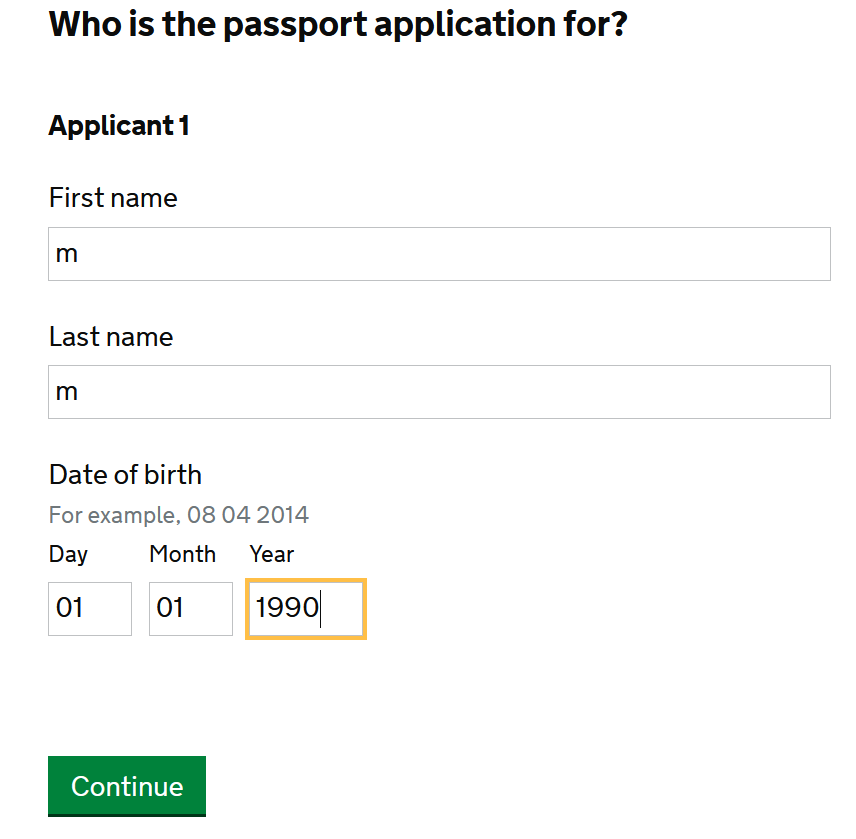
and again checking the network requests for the request and response payload:
Request payload (after formatting):
<ajaxrequest>
<insthash>4101-d9689b26a765a87f</insthash>
<post url='https://www.passportappointment.service.gov.uk/outreach/PublicBooking.ofml'>
I_SUBMITCOUNT=1&
I_INSTHASH=4101-d9689b26a765a87f&
I_PAGENUM=4&
I_JAVASCRIPTON=1&
I_UTFENCODED=TRUE&
I_ACCESS=&
I_TABLELINK=&
I_AJAXMODE=&
I_SMALLSCREEN=&
I_SECTIONHASH=d9689b26a765a87f_Section_start&
FHC_Passport_count=&
F_Passport_count=1&
F_Applicant1_firstname=m&
F_Applicant1_lastname=m&
FD_Applicant1_dob=1&
FM_Applicant1_dob=1&
FY_Applicant1_dob=1990&
F_Applicant2_firstname=&
F_Applicant2_lastname=&
FD_Applicant2_dob=&
FM_Applicant2_dob=&
FY_Applicant2_dob=&
F_Applicant3_firstname=&
F_Applicant3_lastname=&
FD_Applicant3_dob=&
FM_Applicant3_dob=&
FY_Applicant3_dob=&
F_Applicant4_firstname=&
F_Applicant4_lastname=&
FD_Applicant4_dob=&
FM_Applicant4_dob=&
FY_Applicant4_dob=&
F_Applicant5_firstname=&
F_Applicant5_lastname=&
FD_Applicant5_dob=&
FM_Applicant5_dob=&
FY_Applicant5_dob=&
BB_Next=
</post>
</ajaxrequest>
We can repeat this process for the other pages until we get to the page that contains the table data, making note of the AJAX routines that are called and the data in the request payload.
The following code can be used to find the instance hash from the source of the main url and to get the data required for the AJAX routine in the request payload.
from typing import Dict
import requests
from bs4 import BeautifulSoup
import pandas as pd
session = requests.Session()
def get_insthash(MAIN_URL: str) -> str:
"""
Get the insthash.
Params:
MAIN_URL: str
The main URL of the website.
Returns:
str
Instance hash.
"""
data = session.get(MAIN_URL)
soup = BeautifulSoup(data.text, 'html.parser')
insthash_data = soup.find('input', {'name': 'I_INSTHASH'})
if insthash_data is None:
return None
return insthash_data['value']
def get_ajax(
MAIN_URL: str,
insthash: str,
params: Dict = None,
init: bool = False,
) -> str:
"""
Get the ajax text to process JS request.
Params:
MAIN_URL: str
The main URL of the website.
insthash: str
Instance hash.
params: Dict
Parameters to pass to the request.
init: bool
Whether to get the initial data or not.
Returns:
str
The ajax text for the post request.
"""
open_tag = f"<ajaxrequest><insthash>{insthash}</insthash><post url='{MAIN_URL}'>"
if init:
return open_tag + "</post><saving>TRUE</saving></ajaxrequest>"
params_list = [f'{key}={value}' for key, value in params.items()]
return open_tag + '&'.join(params_list) + '</post></ajaxrequest>'
Moral of the story: Always try to reproduce the AJAX routines before trying something more complicated or heavy like using an automated browser.
The full code, including the AJAX request data for each page, can be viewed from: appointments_ft.py
A similar module has been created for the UK Passport Premium Service. This service is based on a different system which requires only POST/GET requests with a CSRF token to get the table data: appointments_op.py
Does this still hold in 2026?
The specific payloads above are a snapshot of one government booking system, and the insthash / I_PAGENUM fields drift over time. Treat them as an illustration of the technique, not as a working scraper. The technique itself holds up well — but the surrounding landscape has moved, in ways worth knowing about before you start.
TLS fingerprinting
The biggest shift is that “look like a browser” is no longer about headers. Around 2024 TLS fingerprinting moved from an advanced anti-bot measure to a baseline one, and by 2026 it is standard on most commercial sites. When requests opens an HTTPS connection, the shape of its TLS handshake — cipher suite ordering, extensions, HTTP/2 settings frames, summarised as a JA3 or JA4 hash — looks nothing like Chrome’s. Setting a browser User-Agent on a requests session is now close to useless on a protected site: the handshake gave you away before a single header was read.
The Python answer is curl_cffi, which wraps curl-impersonate and reproduces a real browser’s TLS and HTTP/2 fingerprint. It is a drop-in replacement for the requests API:
from curl_cffi import requests

session = requests.Session(impersonate="chrome")
data = session.get(MAIN_URL)
You can check whether the impersonation actually works by sending your client to tls.peet.ws or ja4db.com, which return your live JA3/JA4 hashes as JSON — compare them against a real Chrome run from the same IP rather than assuming.
When you genuinely need a browser
Replaying AJAX still beats driving a browser whenever the site is only rendering data client-side. But if you hit a “Checking your browser…” interstitial, or a cf_clearance cookie appears after a pause, that is a JavaScript challenge and no amount of TLS impersonation will get you through it — the challenge has to be executed.
Selenium is no longer the default choice for that; Playwright has largely replaced it, with a better async API, auto-waiting, and browser binaries it manages itself. Note that vanilla Playwright is not stealthy — Cloudflare and similar systems look at WebGL and canvas fingerprints, the navigator.webdriver flag, plugin lists, and behavioural signals. The commonly recommended stealth plugin for Puppeteer has not been actively maintained since early 2025.
The pattern most people converge on in 2026 is a hybrid: let a real browser solve the challenge once, extract the resulting clearance cookie, then hand it to curl_cffi for the hundreds of fast follow-up requests. You pay the browser cost once rather than on every call — a browser context costs roughly 200–400 ms and 80–150 MB of RAM more per page than an HTTP client.
A rough decision order:
| Situation | Tool |
|---|---|
| Static HTML, no protection | requests / httpx |
| Data behind an AJAX/XHR call, no protection | requests — replay the call, as in this post |
| Blocked despite correct headers | curl_cffi with impersonate |
| JavaScript challenge or genuine interaction needed | Playwright, then reuse the cookie |
Finding the call faster
The devtools workflow in this post still applies, but there is a shortcut worth knowing: in the Network tab, right-click any request and choose Copy → Copy as cURL, then paste it into curlconverter.com to get working Python. That gets you a reproducing request in about thirty seconds, and you can strip out the unnecessary headers from there.
One thing that has not changed
Check robots.txt and the site’s terms, identify yourself honestly in the User-Agent where you are not actively being blocked, rate-limit yourself, and cache aggressively so you are not re-requesting pages you already have. The passport project above worked because it made a small number of requests to a public availability endpoint — the kind of use that is defensible. Hammering a service until it degrades is not, regardless of which library you use.
Moral of the story, still: always try to reproduce the AJAX routines before reaching for something heavier. The browser is a fallback, not a starting point.